At the end of the month,

Send invoices and receipts to a workspace you share with your accountant. See what has been reviewed, what is missing and which document needs a follow-up.

A month of documents. One place.

Studio SRL

September 2026

Choose a document to see its details

2 documents reviewed 1 to clarify

RECEIPT

Station SRL

19 September 2026

Total
RON 245.00

Receipt number: unreadable

To clarify

A clearer photo is all it needs.

Your accountant

„The receipt number is not visible. Could you upload another photo showing the top of the receipt?”

Upload the corrected photo to the same document. The original version and comment stay in its history.

Sent by client Accountant’s comment

INVOICE

Supplier SRL

18 September 2026

Total
RON 1,250.00

Invoice EX 018

Reviewed

Reviewed. Right where you need it.

Your accountant

„I have checked the invoice details. The document is validated.”

The invoice, reviewed details and history stay together. Come back to them whenever you need them.

Sent by client Reviewed by accountant

BANK STATEMENT

Studio SRL

19 September 2026

Period
September 2026

Manually uploaded document

Reviewed

Your statement belongs here too.

Your accountant

„I have reviewed the document uploaded for September.”

Upload the PDF statement for the right company. Your accountant finds it alongside the other documents for that month.

PDF uploaded by client Reviewed by accountant

The invoice details.
Your accountant’s comments.

Details you can review.
Beside the original document.

Your accountant checks the supplier, date and amounts before validation.

PDFSupplier invoice.pdf
Supplier
Supplier SRL
Document date
18 September 2026
Document total
RON 1,250.00

A question about the receipt.
The answer beside it.

The question and reply stay with the same document.

Fuel receipt.jpg

“Could you send a clearer photo?”

Your accountant’s comment

Make a correction. Keep the context.

The corrected photo and earlier version stay in the history.

See what is coming.

See configured deadlines and company notifications.

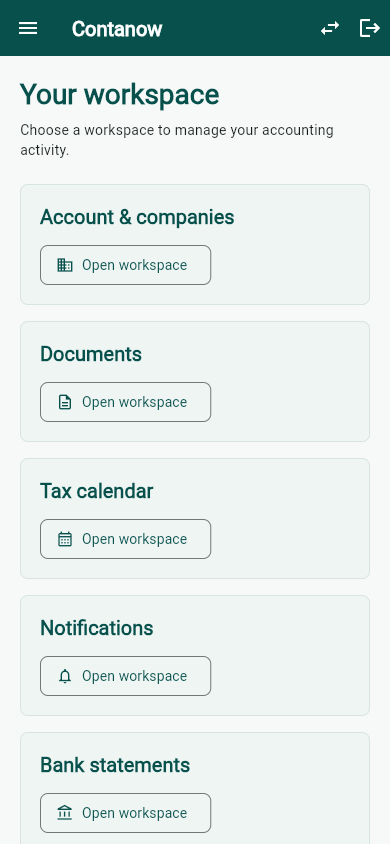
ContaNow application capture at phone width: the client workspace with demonstration data.

Send documents from your phone.
Find the replies there too.

  1. 01

    Keep the document handy.

    A PDF or a clear photo of the invoice or receipt.

  2. 02

    Send it to the right company.

    Choose the company and period, then upload the document.

  3. 03

    Follow up if a correction is needed.

    The status and your accountant’s comments stay with the document.

See how to send your first document

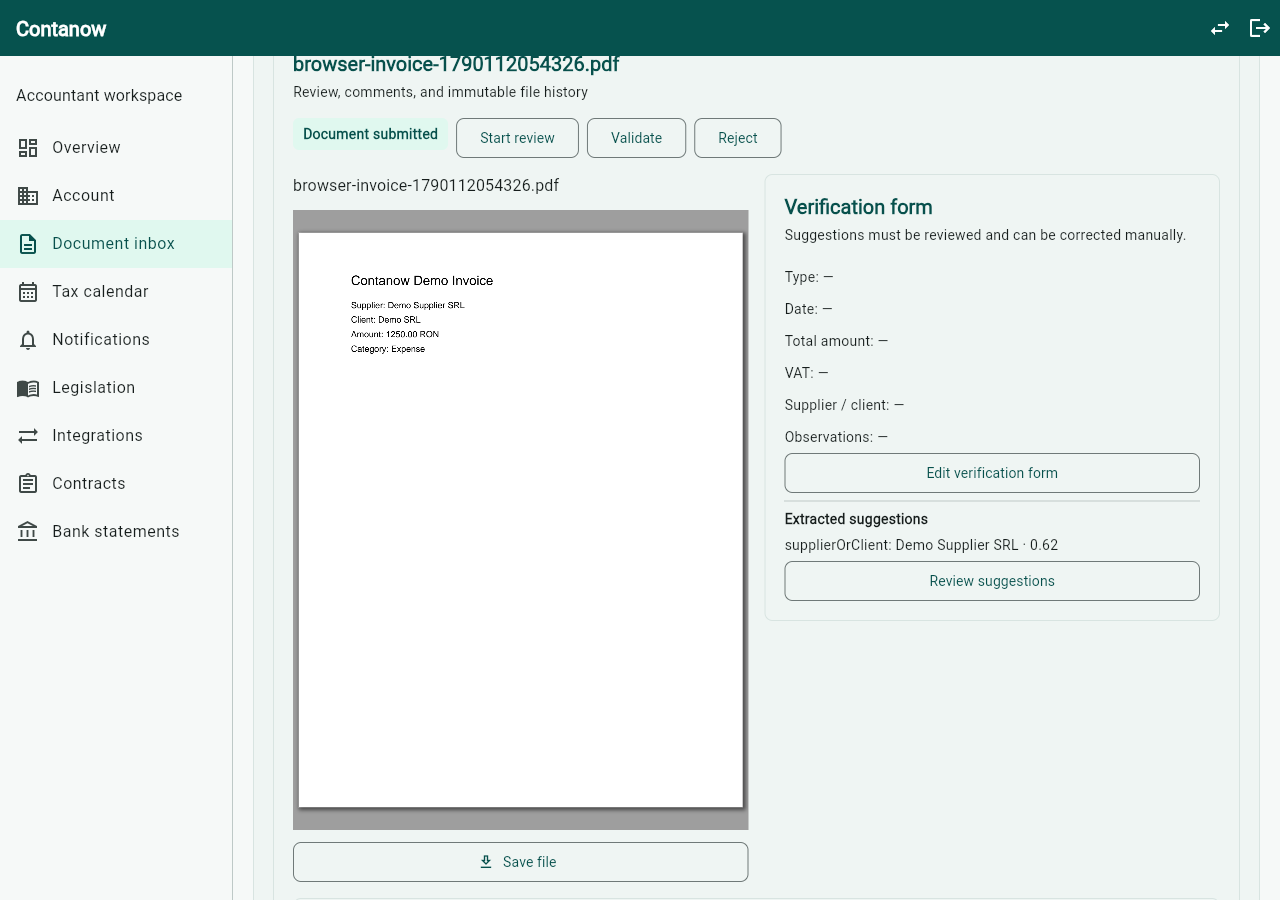
The document in view.
The details beside it.

01

Check the information.

Compare the document with the form and correct the details.

02

The decision is yours.

Validate the document or explain what needs correcting. Suggestions do not replace your review.

03

Keep the context.

Find comments and earlier versions with the document.

Explore the accountant workspace
ContaNow Document review
ContaNow application showing the PDF document alongside the accountant’s review form.

Several companies.
Separate documents.

Each company has its own documents and access.

For clients
Your companies. One account.Switch between your companies and find each company’s documents in the right place.
For accountants
Your clients’ companies. One portfolio.See your assigned companies, with their documents and comments kept separate.
Your portfolio03 companies
S
Studio SRLSeptember documents
Reviewed
A
Workshop SRLSeptember documents
To clarify
C
Consulting SRLSeptember documents
Reviewed

For accountants.
For businesses.

Two pricing approaches, depending on how you use ContaNow.

Your company portfolio

Monthly pricing based on the number of companies in your portfolio.

0 companies
Rate per company, per monthTBA
Monthly total0 × TBA = Free

The rate per company will be announced. Move the slider to see the calculation.

Your company is
not VAT registered?

Free.

Use ContaNow for free. VAT-registered companies will pay a monthly rate to be announced.

Companies not registered for VAT
Free
VAT-registered companies
TBAper month

Final rates and commercial terms will be announced.

Explore the workflow

Experiences with ContaNow.
Two perspectives.

Raluca DobreAccountant

When a receipt is hard to read, I request a new photo beside the document. At the next review, both the explanation and the corrected version are there.

Andrei MunteanuBusiness owner

I send the invoice and can see whether it has been reviewed. If something is missing, the accountant’s comment is right there, without searching through conversations.

Ioana VasileAccountant

I work with several companies. I choose a client from the portfolio and see their documents. I like having the comments beside the paperwork.

Mihai PavelBusiness owner

I have two companies and use the same account. I choose the company before uploading documents and know where to return for replies.

Elena StanAccountant

When I receive a corrected version, I can return to the previous one. I can follow what changed and what still needs a review.

Vlad RaduBusiness owner

I have the receipt on my phone, send it to my company and return there to read my accountant’s reply. Each document is easy to follow.

You might be wondering.

Does ContaNow replace my accountant?

No. ContaNow is where you collaborate with your own accountant. They review documents and make accounting decisions. The platform does not provide accounting services or assign an accountant.

Can I manage several companies?

Yes. You can manage several companies you own, while accountants see the companies assigned to them. Documents and access are separated by company.

Can I send documents from my phone?

Yes. The interface adapts to your phone and you can upload PDF documents or JPEG and PNG images. App store availability will be announced separately.

Who is ContaNow for?

Business owners and accountants who work together. ContaNow gives them a shared space for company documents and the discussions around them.

Where can I learn more about the application?

The ContaNow overview has more details, while How it works explains collaboration between a client and an accountant.

How do I start working with my accountant?

Create an account in the application and choose the client or accountant role. Set up your profile and company, then associate the accountant with the relevant company.

How do you handle
your documents today?

Tell us how you send and review documents today.
Let’s discuss whether ContaNow fits your company or client portfolio.